Controlling an RND/Korad Bench Power Supply from Python
Contents
An app for controlling the RND 320-KA3005P bench power supply from a computer. The RND 320-KA3005P is a rebranded Korad KA3005P (0–30 V, 0–5 A), so the app also works with the Korad and other supplies from the same series.
The project started while I was learning Python on Linux. The idea is to learn how to use Python to control electronic devices and automate measurements: a power supply, an Arduino, a digital multimeter and so on.
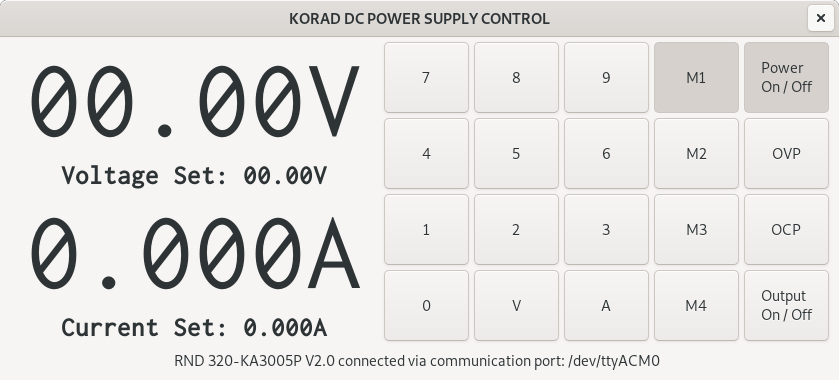
The user interface was designed in Glade, and the app is written in Python 3 with PyGObject (GTK 3) and pyserial. It was developed on Debian and should also run on Raspberry Pi OS.
What the app does so far
- finds the power supply among the serial ports by its USB ID (
0416:5011), - shows the device name and the set and actual output voltage and current,
- sets the voltage and current from the on-screen keypad or the computer keyboard,
- turns the output on and off,
- turns the OVP (overvoltage) and OCP (overcurrent) protections on and off,
- recalls stored settings from memories M1–M5,
- turns the supply’s output off when the app closes.
Usage
The voltage is set with the V key followed by four digits, e.g. 1 2 0 0 for 12.00 V. The current is set with the A key followed by four digits, e.g. 1 5 0 0 for 1.500 A. After the fourth digit, the value is sent to the power supply.
Everything also works from the computer keyboard:
| Key | Action |
|---|---|
0–9 | enter digits |
v | set voltage |
a | set current |
o | toggle the output |
u | refresh the display |
Talking to the power supply
On Linux, the power supply shows up as a virtual serial port, usually /dev/ttyACM0. Commands are short text strings with no line terminator:
| Command | Meaning |
|---|---|
*IDN? | device name and version |
STATUS? | device status |
VSET1? / ISET1? | set voltage / current |
VSET1:12.00 / ISET1:1.500 | set the voltage / current |
VOUT1? / IOUT1? | actual output voltage / current |
OUT1 / OUT0 | output on / off |
OVP1 / OVP0 | overvoltage protection on / off |
OCP1 / OCP0 | overcurrent protection on / off |
RCL1–RCL5 | recall settings from memory M1–M5 |
Wait about 100 ms between commands, otherwise the power supply does not have time to respond.
Running the app
On Debian and Raspberry Pi OS, the required packages are in the distribution repository:
sudo apt install python3-gi gir1.2-gtk-3.0 python3-serial git
To access the serial port without root, your user must be in the dialout group. The change takes effect after you log in again:
sudo usermod -a -G dialout $USER
Download and run:
git clone https://github.com/ebaketa/rnd_320_ka3005p-pygobject.git
cd rnd_320_ka3005p-pygobject
python3 rnd_320_ka3005p-pygobject.py
Note
Run the app from its own directory, because it looks for the rnd_320_ka3005p-pygobject.glade interface file in the current directory. The power supply must be connected and switched on before you start the app.
Planned
- measurement automation, e.g. stepping the voltage and logging the current,
- saving measured data to a file,
- plotting the measurements.
Updated in October 2026
This description was refreshed to match the current state of the code. Since it was first published in February 2021, the app has been ported to Python 3, gained memories M1–M5 and keyboard control, and now finds the power supply on its own.